6 min read

How to Budget for AI Agents: Practical Steps to Manage Operational Costs & Token Consumption

How to Budget for AI Agents: Practical Steps to Manage Operational Costs & Token Consumption
7:02

At Tonic3, we are hearing one question more than any other from business leaders eager to adopt AI: "How do we budget for a project when the cost is based on usage?"

The fear of running up an unexpected, five-figure token bill is real. But here’s the good news: budgeting for new AI projects or implementing a sustainable AI system doesn't have to hold you back from getting started.

Modern AI platforms allow you to create powerful guardrails that manage, throttle, and cap token usage so you can launch with confidence. The secret is to stop thinking of AI as an abstract IT cost and start treating it like a controlled utility.


How to Manage Operational Costs & Token Consumption
7:02


Section 1: The Business Leader's Budgeting Mindset

For business stakeholders, the budgeting conversation starts with a holistic view of the investment. You can use this AI Budget Planning Template we've developed as a guide for organizing costs into three strategic categories:

The Tonic3 AI Budget Framework


Cost Category

Focus (Non-Technical Language)

Why it Matters

The Build
(Initial Investment)

The one-time costs to get the agent ready: setup, data cleaning, integration with existing software (CRM, HRIS), and initial model training.

This upfront planning prevents costly rework later and ensures the agent fits seamlessly into your workflows.

The Run
(Operational Costs)

The variable costs of using the agent every day: the cost of tokens (usage), API access fees, and ongoing maintenance.

This is where guardrails are essential. We control these costs by setting financial and speed limits.

The People
(Expertise)

The cost of the specialized team needed to develop, manage, and scale the agent—including internal PMs and external AI development partners.

Securing the right expertise ensures the agent is built correctly and delivers measurable ROI.

PLAN YOUR AI BUDGET This is your opportunity to move from "what if" to "this is our plan." Open the free AI Planning Budget Template (format: google sheet)  


Guardrails: Setting Your Limits (The Simple View)

Once you define the value, you use the available agent configuration settings to create mandatory financial boundaries:

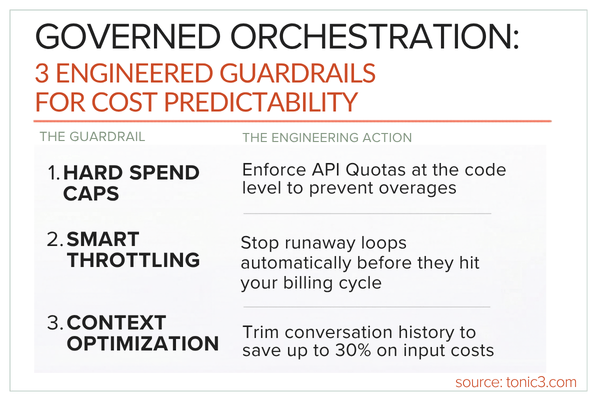
  • The Monthly Cap (Financial Safety): You can set a Monthly quota limit ($). Once this dollar amount is reached, the agent usage is halted or rerouted. This is your ultimate safety net against budget overruns.
  • The Speed Limit (Usage Throttling): A Limit of executions per minute prevents "runaway" usage or an application bug from generating excessive, rapid calls. This is the simplest way to enforce a fair usage policy across teams.
  • The Time Limit (Efficiency Control): A Time limit (hs) (e.g., 24 hours) for a single conversation ensures that an agent isn't held in an open, expensive state indefinitely, which can consume unnecessary tokens.

Our takeaway for you: Start your project with a small, conservative budget and use these guardrails to ensure you never exceed it.


Section 2: The Technical Deep Dive: Setting Up Guardrails That Work


For Engineers, Data Scientists, and IT Managers, we understand your priorities or more focused on the implementation. Cutting the waste, boosting efficiency, and keeping every dollar working smarter has to be part of the design and the management of each agent you deploy. 

AI budgeting is rooted in Token Economics. A token is the basic unit of work—it's roughly 3/4 of a word. You are billed based on Input Tokens (your prompt) and Output Tokens (the AI’s response). Since Output Tokens are significantly more expensive, your budget strategy must prioritize reducing unnecessary generation.

Controlling Costs with Agent Design Parameters

As an implementation partner, we look at both the user experience for the employees AND the teams managing the agents usage. We'll provide an Agent Design Studio where teams can manage settings that directly translate into cost control levers. 
Agent Design Parameter

Technical Budgeting Impact (The "Run" Cost)

Tactic for Savings

Model
(e.g., Claude 4 Sonnet)

Directly sets the base cost per token (cost of compute).

Dynamic Model Selection: Route simple, high-volume tasks (like FAQs) to cheaper models (e.g., GPT-4 mini) and reserve powerful models (like Claude 4 Sonnet) only for complex reasoning tasks.

Execution limits per minute

Implements API Rate Limiting. Prevents excessive, rapid calls that could lead to budget spikes and API provider penalties.

Set the limit (e.g., 5-15 executions per minute) below your cloud provider’s default or your daily budget divided by the number of active minutes, ensuring predictable hourly spend.

Monthly quota limit ($)

Implements a Hard Cap on total monthly spend (The "Run" cost).

This is your emergency brake. The quota should be set to 90% of the agreed-upon project budget, with a low threshold alert at 75%.

Time limit (hs) / Inactivity time limit (hs)

Controls the session cost and context window token consumption.

Context Optimization: Aggressively summarize the conversation history or reduce the limit on the Max number of user messages to keep the expensive input token count low.

The Power of the Prototype

You shouldn't guess your usage—you should measure it. A short-term prototype or MVP (Minimum Viable Product) is the ideal way to get real-world metrics. Run the agent for a week with a small user group, and use the logs to extract the Average Input Tokens, Average Output Tokens, and Total Daily Calls. This data then allows you to create a scientifically-backed budget forecast that defines your precise "Run" costs before scaling.

Ready to get started? We love prototyping as a way to learn and iterate efficiently. 


Section 3: Prototype to Production: Use Cases & Budget Analysis

We’ve selected two common internal business operations agents to show how real guardrails manage the "Run" cost.

Goal: Reduce internal support tickets by providing instant, accurate answers to common policy and time-off questions. (A high-volume, low-complexity task that can benefit both HR teams and PMO organizations. 

Budget Component

Production Forecast (Monthly)

Guardrail Strategy (Image Parameter Application)

Model Selection

GPT-4 mini (Lower cost per token)

Set Model:
Choose the lowest-cost model that can reliably handle retrieval (based on prototype data).

Monthly Quota

10,000 calls/month

Monthly quota limit ($):
Set a hard cap of $500 for the total monthly "Run" cost.

Usage Throttling

Avg. 50 calls/day

Execution limits per minute:
Set to 15 to prevent any single employee from monopolizing the service.

Session Control

Low-context, transactional queries.

Quota limit per conversation (S):
Set a low dollar ceiling (e.g., $0.10) to limit context window size.


Goal: Automate lead prioritization, summarizing company news, and drafting initial prospecting emails (requires the "Web Search" skill and complex reasoning). (A low-volume, high-complexity task)

Budget Component

Production Forecast (Monthly)

Guardrail Strategy (Image Parameter Application)

Model Selection

Claude 4 Sonnet
(Higher cost per token)

Set Model: Accept higher cost for the superior quality of accurate and personalized copywriting needed for revenue-driving tasks.

Monthly Quota

1,500 calls/month

Monthly quota limit ($):
Set a higher, but still firm, cap of $3,000 for the sales department.

Usage Throttling

Avg. 75 calls/day (50 SDRs)

Execution limits per minute:
Set to 5 to protect against API rate limits and long-running, expensive search queries.

Session Control

Longer, more complex research conversations.

Max number of user messages:
Set a limit (e.g., 10 messages per agent per day) to enforce mindful usage and prevent excessive token consumption.


Conclusion: Take Control of Your AI Spend

The future of business is being built on AI, and your budget should be the rudder that guides your projects, not the anchor that holds them in place.

By adopting a smart, tiered approach—using cheaper models for high-volume tasks and aggressive guardrails to limit execution and set hard dollar caps—you can confidently prototype and deploy AI agents within your organization.

Ready to transform your financial planning? You can access the Tonic3 AI Budget Planning Template for reference here: Budget Template for AI Planning. Start making informed decisions and driving impactful AI initiatives today.


Ready to put AI to work for your enterprise? Connect with Tonic3 to accelerate your automation journey. Whether you need tailored solution recommendations, expert implementation support, or a strategic discovery session, our team is here to guide you from first steps to sustainable impact. Engineering intelligent experiences for real business impact is our sweet spot— reach out now to explore how Tonic3 can help your organization lead with intelligent automation.


Your AI Budgeting & Implementation Questions Answered:

How can HR or PMO departments launch an AI agent project without fear of uncontrolled spending?

The key is to start with a clear understanding of the project's value and anticipated usage volume, then implement robust financial guardrails. Our Tonic3 AI Budget Framework helps you categorize costs (Build, Run, People), and modern AI agent platforms allow you to set strict monthly dollar caps and execution limits per minute. This means you can confidently prototype with a small budget, knowing the system will automatically prevent overspending, allowing you to measure actual usage before scaling.

What are the most effective technical parameters to control token consumption and API costs for AI agents in production?

To effectively control costs, technical leaders should focus on Model Selection, Execution Limits, and Context Management. Utilize dynamic model selection to route simpler tasks to cheaper models (e.g., GPT-4 mini) and reserve high-cost models (like Claude 4 Sonnet) for complex, high-value tasks. Implement "Execution limits per minute" to prevent rapid, excessive API calls. Crucially, optimize context management by aggressively summarizing conversation history or setting limits on "Max number of user messages" to reduce expensive input token counts. Prototypes are essential to gather real-world token usage data for precise forecasting.

How can a team budget for AI agent usage?

Budgeting for AI agents involves considering "Build" (setup, integration), "Run" (operational costs like tokens and API fees), and "People" (expertise) expenses. The "Run" costs are best managed by setting clear financial guardrails directly within your AI agent platform, such as a monthly spending quota or limits on executions per minute. Starting with a prototype allows you to accurately measure real usage and fine-tune these limits, ensuring your project stays within budget.

How can I prevent unexpected costs when deploying a generative AI agent?

Preventing unexpected costs in generative AI agent deployment hinges on proactive planning and strict usage controls. First, define the project's scope and expected usage through a budgeting framework. Then, critically, configure guardrails in your agent's settings:

  • Set a "Monthly quota limit ($)" to establish a hard spending cap.
  • Implement "Execution limits per minute" to throttle call frequency.
  • Optimize model choice to match complexity with cost. These measures, informed by prototype data, ensure predictable operational costs.


3 Steps to Mid-Market Success with Strategic Azure AI Integration

3 Steps to Mid-Market Success with Strategic Azure AI Integration

For Change Champions and Performance Drivers, Azure AI is not just a technological advancement; it's a strategic asset that can transform your...

Read More
AI Agents Have Arrived: The Clock is Ticking on AI Governance

AI Agents Have Arrived: The Clock is Ticking on AI Governance

“AI agents are coming!” If that phrase triggers flashbacks of Paul Revere, you're not alone. The alarm is justified—AI’s impact on business isn't...

Read More
Tonic3 Picks: Top AI & LLM Tools for Enterprise Workflow Automation

Tonic3 Picks: Top AI & LLM Tools for Enterprise Workflow Automation

In today's fast-paced business world, the promise of Artificial Intelligence (AI) and Large Language Models (LLMs) to revolutionize enterprise...

Read More